

Quick answer
The fastest way to capture an entire scrolling webpage is to use a full page screenshot Chrome extension: prepare the page, click the extension, choose Complete page, keep the capture tab stable while it scrolls, review the stitched result, and export PNG, JPEG, or PDF.
For repeat work, a dedicated extension makes it easier to take a full webpage screenshot in Chrome and capture a complete page in Chrome without manually stitching separate viewport images.
Chrome DevTools can also capture a full page without an extension, but a dedicated tool is more practical when you need repeatable capture, local history, annotation, redaction, batch URLs, device presets, or shareable review output.
- Wait for fonts and lazy-loaded images before capturing.
- Open accordions and dismiss overlays that should not appear.
- Do not resize, zoom, or switch the capture tab during scrolling.
- Review sticky elements and sensitive data before export or sharing.
Choose between DevTools and a Chrome extension
Chrome DevTools includes a built-in Capture full size screenshot command. It is useful for an occasional technical capture when you are comfortable opening DevTools and do not need an editor, history, batch input, or a guided export workflow. The result is usually a single PNG of the rendered document.
A full page screenshot Chrome extension is better for repeated operational work. It reduces the number of steps, provides a clear capture status, stores the result in a purpose-built workspace, and can add annotation, redaction, filename rules, PDF export, device presets, or controlled sharing. Choose based on the next task, not only on the capture itself.
Neither method can reveal content that the page has not rendered or that your account cannot access. A screenshot records the current visual state; it is not a substitute for an authenticated export, source data, or an accessibility audit.
Choose the page state before capture
Open accordions, select the correct tab, dismiss cookie banners, and close chat widgets or modal overlays that should not appear. Wait for web fonts, charts, and images. If the page lazy-loads content, scroll through it once and return to the top before starting the final capture.
Set the browser window to the viewport you want to document. Desktop width, zoom level, signed-in state, selected filters, and responsive breakpoints can all change the rendered page. For reproducible QA evidence, record the URL, viewport, browser version, capture time, and relevant account or feature-flag state.
A full-page screenshot records what is visibly rendered. Collapsed content remains collapsed, unfinished media may remain blank, and personalized data can appear in the final pixels. Prepare the page as carefully as you would prepare a document for external review.
Capture the complete scrolling area
A complete-page capture measures the document, scrolls through the page, captures viewport-sized frames, and combines them into one image. Start from the toolbar popup, choose Complete page, and follow the visible progress. Extremely tall pages take longer because every frame must be captured and assembled.
Keep the capture page stable. Do not change browser zoom, resize the window, switch the active capture tab, or interact with sticky navigation during the run. Those changes can alter coordinates between frames and produce gaps, duplicated elements, or a canceled capture.
AI Full Page Screenshot – CTC Snap restores the page after a capture attempt and records a clear result or error. If the website blocks scripted scrolling or keeps adding content, stop at a safe boundary rather than assuming the resulting image is complete.
Review common capture problems
Sticky headers, cookie controls, and floating chat buttons can appear in more than one frame when the page changes their position during scrolling. Animations, rotating banners, video, and live dashboards may display different moments in adjacent sections. Pause motion or capture a static state when the page provides that option.
Blank bands often mean an image or section loaded after its frame was captured. Missing lower content can indicate infinite scrolling or a browser memory limit. A page that uses its own nested scroll container may require capturing that component separately because the document itself is not the scrolling surface.
When troubleshooting, reproduce with a normal page width and default zoom, disable unnecessary page overlays, wait for the network to settle, and retry once. If the problem persists, save the URL and a visible-area screenshot so support can distinguish a website-specific layout issue from a general capture failure.
- Repeated header: close or minimize sticky navigation before capture.
- Missing images: preload lazy content and wait for image decoding.
- Different animation frames: pause motion or capture a static state.
- Very tall page: remove irrelevant sections or use a bounded capture.
Review, crop, annotate, and redact
Open the completed image at full size and inspect the first frame, several joins, and the bottom edge. Confirm that the source title, totals, warnings, and completion state are legible. Crop browser-independent whitespace or irrelevant page regions only after you have preserved the original result.
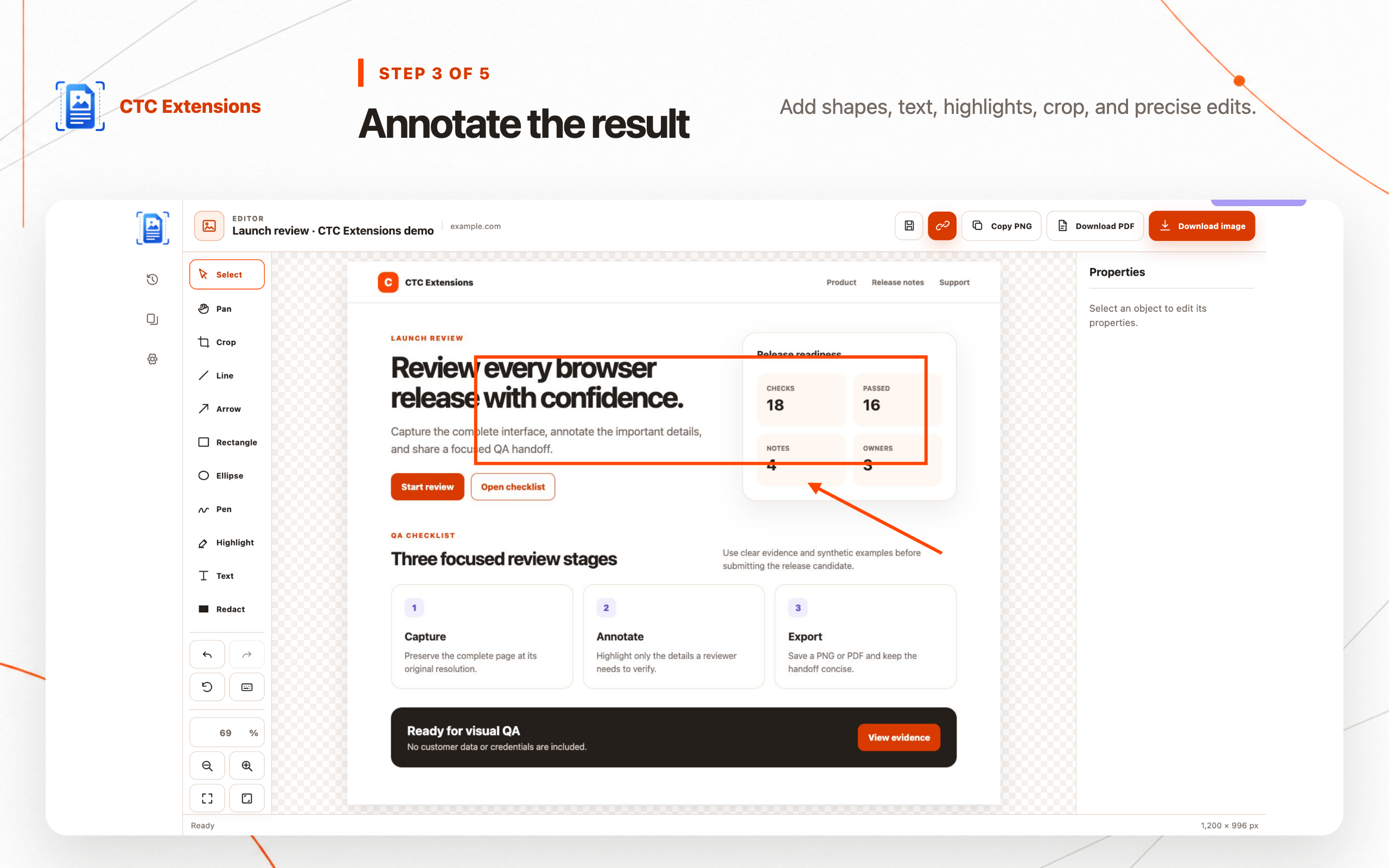
Use arrows, rectangles, highlights, and short labels to direct attention. Apply solid redaction to personal information, access tokens, customer records, internal URLs, or private account details. Decorative blur may still reveal shapes and should not be treated as irreversible redaction unless the exported pixels are actually replaced.
Keep one clean original and create a separate annotated export. That pattern preserves evidence while allowing a focused version for a bug report, design review, customer explanation, or approval workflow.
Export for the next task
Use PNG for sharp text, diagrams, and interface edges. Choose JPEG for image-heavy pages when a smaller file is more important than lossless detail. Use PDF when reviewers expect a document, need a consistent print workflow, or will archive the page with other project files.
Name the file with the page or task, state, viewport, and capture date. For example, checkout-error-desktop-2026-07-23 is more useful than screenshot-17. Advanced filename templates can standardize this across a team, but the filename should remain understandable outside the extension.
Inspect the exported file in its destination application. A correct editor preview does not guarantee that a compressed image, printed PDF, ticket attachment, or chat preview will remain readable.
Protect privacy when storing or sharing captures
A webpage screenshot can contain more sensitive information than the visible issue: names in navigation, private URLs, account IDs, balances, browser notifications, and customer records may be captured far above or below the section you planned to share. Review the entire image, not only the annotated area.
AI Full Page Screenshot – CTC Snap keeps captures and editing local by default. If you explicitly create a temporary share link, treat the link as access to the underlying image and send it only to intended reviewers. Remove expired or no-longer-needed captures according to your project retention policy.
For regulated or confidential workflows, prefer a local export into an approved system rather than an ad hoc link. A local-first extension reduces unnecessary transfer, but the operator still controls where the final file is stored and who receives it.
Full-page screenshot FAQ
How do I take a full page screenshot in Chrome?
Open the finished page, start a complete-page capture from a full page screenshot Chrome extension, keep the page stable while it scrolls, then review and export the result. Chrome DevTools also offers a Capture full size screenshot command for occasional use.
Why is part of my full-page screenshot missing?
Missing content usually comes from lazy loading, infinite scrolling, a collapsed section, a capture limit, or a page that changes while scrolling. Load the content first, pause animation when possible, and retry with a stable page state.
Can a full-page screenshot include content below the fold?
Yes. A complete-page capture scrolls through the document and combines viewport-sized frames, so content below the initial viewport is included when the page exposes a stable scrolling area.
Which format should I use: PNG, JPEG, or PDF?
Use PNG for text and interface detail, JPEG for image-heavy pages where a smaller file matters, and PDF for review, archiving, or a document-oriented handoff. Always inspect the exported result before deleting the editable capture.
Are full-page screenshots uploaded to a server?
AI Full Page Screenshot – CTC Snap keeps capture and editing local by default. A file leaves the browser only when the user explicitly creates a temporary share link. Review the product's current privacy disclosure before enabling any sharing workflow.